Just look at the domain whois of iPhone5.com
Registrant:
Apple Inc.
Domain Administrator
1 Infinite Loop
Cupertino, CA 95014
US
Email: domains@apple.com
Registrar Name....: CORPORATE DOMAINS, INC.
Registrar Whois...: whois.corporatedomains.com
Registrar Homepage: www.cscprotectsbrands.com
Domain Name: iphone5.com
http://who.godaddy.com/whois.aspx?domain=iphone5.com&prog_id=GoDaddy
Thursday, May 31, 2012


Wednesday, March 07, 2012
iOS 5.1 is here and obviously the new iPad too
iOS 5.1 Features
Here is the information from Apple
----
This update contains improvements and bug fixes, including:
- Japanese language support for Siri (availability may be limited during initial rollout)
- Photos can now be deleted from Photo Stream
- Camera shortcut now always visible on Lock Screen for iPhone 4S, iPhone 4, iPhone 3GS and iPod touch (4th generation)
- Camera face detection now highlights all detected faces
- Redesigned Camera app for iPad
- Genius Mixes and Genius playlists for iTunes Match subscribers
- Audio for TV shows and movies on iPad optimized to sound louder and clearer
- Podcast controls for playback speed and a 30 second rewind for iPad
- Updated AT&T network indicator
- Addresses bugs affecting battery life
- Fixes an issue that occasionally caused audio to drop for outgoing calls
For information on the security content of this update, please visit this website:
For more: http://support.apple.com/kb/HT1222
-----
How to update your iPhone to iOS 5.1?
If you have iOS 5 installed;
- Just go to Settings
- Tap on General
- Tap on Software Update (Make you iphone is in charging mode. If the batter is under 50% capacity, the software update wont run.)
- Enjoy iOS 5.1!!!
Sunday, November 20, 2011
Navigon 2.0 review
First of all I was able to get over with the problem with the upgrade. All I did was to delete the current app and download the new one.
The reduction of the size of the App to like few hundreds of megabyes because you select only the states you want. Keep in mind, if you have Panoramic 3D as a previous purchase, it could take another 700 MB's
I bought the quarterly map update which I am reading elsewhere that I will get charged annually. I cant seem to find any fine print .
Road test. (W/iPhone 4)
Overall I am impressed so far, but waiting to see much more in action. I will have an update shortly.
The reduction of the size of the App to like few hundreds of megabyes because you select only the states you want. Keep in mind, if you have Panoramic 3D as a previous purchase, it could take another 700 MB's
I bought the quarterly map update which I am reading elsewhere that I will get charged annually. I cant seem to find any fine print .
Road test. (W/iPhone 4)
- There was no delay in starting the app.
- The zoom feature is included, but to get back to normal view, you have to click on the arrow on top of the screen. Do a simulation test before you put navigation in to use.
- I am hoping to get the latest map updates because there are new roundabouts where I live which navigon doesnt have.
- "Caution" messages are kind of delayed if you are playing music at the same time... There was a definite a delay of like 4-5 seconds from pausing the Music to the message.
Overall I am impressed so far, but waiting to see much more in action. I will have an update shortly.
Thursday, November 17, 2011
Navigon 2.0
I think I should have patience. But paid the most bucks for an iPhone app, now its irking me that I can't get that app working because of no connection to the server?
Today I updated my Navigon to 2.0. When I restarted the app, I was given some instruction to download some maps. But after that it kept on saying "A connection to the NAVIGON servers could not be established. Please restart the App."


What to do?????
Update: Deleting the app and downloading it again from the Appstore will fix it. Looked like it will recognize your previous purchase.
Keep in mind, all the data in that app like recent destinations and favorites will be erased.
Thanks to Daniel for the update
Today I updated my Navigon to 2.0. When I restarted the app, I was given some instruction to download some maps. But after that it kept on saying "A connection to the NAVIGON servers could not be established. Please restart the App."


What to do?????
Update: Deleting the app and downloading it again from the Appstore will fix it. Looked like it will recognize your previous purchase.
Keep in mind, all the data in that app like recent destinations and favorites will be erased.
Thanks to Daniel for the update
iOS 5.0.1 update experience
Downloading iOS 5.0.1 was a new experience because for the first time, it was done wirelessly using Wi-Fi.
If you haven't done it here is how to do it.
Make sure you are on Wi-Fi and you should have at least iOS 5.0
The update was close to 45MB. It took me around 10 minutes.
If you haven't done it here is how to do it.
Make sure you are on Wi-Fi and you should have at least iOS 5.0
- Go to Settings
- General
- Software Update
The update was close to 45MB. It took me around 10 minutes.
Wednesday, October 12, 2011
How to get to the new features of iOS 5 on iPhone
To get the camera icon on home screen
Double click on home button on iPhone
To take a picture, just press the "volume up" button on the left side of the iPhone.
Notification window
Slide/swipe down with your thumb from top bar(where it shows time, battery meter and network signals) once you are on the main page.
iCloud settings
Settings > iCloud - Select the items you would like to be in the cloud
iCloud settings
Settings > iCloud - Select the items you would like to be in the cloud
iCloud Storage plan upgrade
Settings > iCloud > Account > Storage Plan
Updating iOS automatically after iOs 5 update
Settings > General > Software Update
iTunes Wi-Fi Sync
Settings > General > iTunes Wi-Fi Sync > Sync Now
Keyboard Shortcuts
General > Keyboard > Turn "." shortcut ON
To add a new Shortcut, tap, Add New Shortcut.
Accessibility
Settings > General > Accessiblity
To add a new Shortcut, tap, Add New Shortcut.
Accessibility
Settings > General > Accessiblity
Twitter settings on iOS5
Settings > Twitter > Sign in your twitter username and password and you can add multiple account
Private Browsing in Safari
Settings > Safari > Turn Private Browsing ON under Privacy
iMessage
iMessage is an integrated feature in Messages, but make sure to turn it on inside the settings of Messages.
Settings > Messages> Turn iMessages ON
Read Receipts
Settings > Messages > Send Read Receipts option ON/ OFF
Creating Reading List
Open up a webpage in Safari
Click on the bookmark icon from the bottom, select Add to Reading List.
Opening/Retrieving Reading List
Click on the bookmark icon from safari("open book" icon). Select Reading List.
Settings > Twitter > Sign in your twitter username and password and you can add multiple account
Private Browsing in Safari
Settings > Safari > Turn Private Browsing ON under Privacy
iMessage
iMessage is an integrated feature in Messages, but make sure to turn it on inside the settings of Messages.
Settings > Messages> Turn iMessages ON
Read Receipts
Settings > Messages > Send Read Receipts option ON/ OFF
Creating Reading List
Open up a webpage in Safari
Click on the bookmark icon from the bottom, select Add to Reading List.
Opening/Retrieving Reading List
Click on the bookmark icon from safari("open book" icon). Select Reading List.
Updating iPhone from iOS 4.x to iOS 5
First and foremost: BACKUP !!!!!
Don't follow anything before you do backup.
Connect your iPhone to your PC/MAC. From the iTunes window, when the iPhone icon shows up on the left menu, right click and select Backup.
Just like me, if you were used to be App junkie(i am talking about 240 some apps), it may be a good time to reduce the number of apps you have.
Enough talk...Now lets get to work.
Once you have the backup done, select the iPhone icon, and from the right hand menu, click update and you will be presented with these series of windows.
1) When you click the update button, right next to iPhone image, this window will show up. Click "Download and Update"
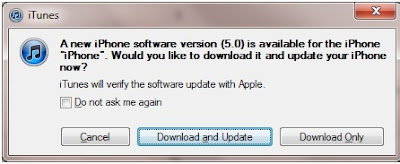
2) I received this message because looks like it figured out that I am not using my primary computer where I had my iTunes library resides. But again, make sure you made a BACKUP before doing these steps


Once everything is finished, you must be wondering what happened to all the Apps, songs and other missing things.
Don't follow anything before you do backup.
Connect your iPhone to your PC/MAC. From the iTunes window, when the iPhone icon shows up on the left menu, right click and select Backup.
Just like me, if you were used to be App junkie(i am talking about 240 some apps), it may be a good time to reduce the number of apps you have.
Enough talk...Now lets get to work.
Once you have the backup done, select the iPhone icon, and from the right hand menu, click update and you will be presented with these series of windows.
1) When you click the update button, right next to iPhone image, this window will show up. Click "Download and Update"

2) I received this message because looks like it figured out that I am not using my primary computer where I had my iTunes library resides. But again, make sure you made a BACKUP before doing these steps

3) Click 'Next'

4) Click 'Agree'

5) Well now its the waiting game. Just follow whatever iTunes tells you.
PLEASE try not to do any other activities on your computer while doing this. Just wait till it finish.
Well I went through the iCloud setup and all once the update was completed.
But my main question was where are all the apps.
The only solution I had was to reconnect my iPhone to my laptop and then when iPhone logo comes up, (Make sure its your primary computer/all of the backed up items are there) click on sync or apply from the right hand screen.
So depending upon how much stuff you have on your iPhone, it could take hours to restore it back to the iPhone...
The main thing I noticed was that most of my folders were gone , now i have a boring process of creating them again.
Thursday, June 24, 2010
iPhone 4 is out. What about the Case?
iPhone 4 case is the hottest topic on the web according to the website Alexa.com. Obvious reason, people didn't want to spend 30-40 dollars for a side bumper cover.
Here is a list that I made to help other iPhoner's to find a case or screen protectors. I haven't yet received my iPhone or the accessories . But I wanted to make sure that I have some kind of protection beforehand, whether it fits or not.
originality of your Apple iPhone 4."
I havent received the product yet. But lets see.Even though it say's for free, the shipping is around $5
protectors. They may be a bit more expensive. But will have some benefits.
There are so many sites offers you cases according to your preference & style. But do a lot of research on what those cases will do for your iPhone. I've bought may be at least 5 cases for my iPhone 3G. But each time I am half satisfied. Either I dont like it that much, but if I like it other problems starts to occur. I had a nice clear case, after a week or so dust started to accumulate between the surfaces, and I had to clean it all the time. Some cases offers you full protection like a full body armor. But you don't want to end up hiding your iPhone. Hardcases are fine, but get Thermoplastic Polyurethane (TPU). Its flexible. Here is a youtube video showing what it is.
My mission is not to spend anything over $10 for cases. So I cant guarantee anything about the quality. The best place in the world for that is Ebay. But just read through every fine print before you buy the item even if it is priced for 99 cents.
I will have a full review of the cases that I am going to receive in a week or so. Hopefully Apple will send my iPhone 4 by July 19 :) ..... So stay tuned!!!
In the mean time if you know any good websites that sells cheap cases, please post it.
Note: I am not advertising for the companies mentioned above. This is just an independent review.
Here is a list that I made to help other iPhoner's to find a case or screen protectors. I haven't yet received my iPhone or the accessories . But I wanted to make sure that I have some kind of protection beforehand, whether it fits or not.
- Boxwave's Pure Crystal Slip : Free, but shipping is around $5
originality of your Apple iPhone 4."
I havent received the product yet. But lets see.Even though it say's for free, the shipping is around $5
- Meritline has black silicone case and screen protector - $2 for each. Free standard shipping in US.
protectors. They may be a bit more expensive. But will have some benefits.
There are so many sites offers you cases according to your preference & style. But do a lot of research on what those cases will do for your iPhone. I've bought may be at least 5 cases for my iPhone 3G. But each time I am half satisfied. Either I dont like it that much, but if I like it other problems starts to occur. I had a nice clear case, after a week or so dust started to accumulate between the surfaces, and I had to clean it all the time. Some cases offers you full protection like a full body armor. But you don't want to end up hiding your iPhone. Hardcases are fine, but get Thermoplastic Polyurethane (TPU). Its flexible. Here is a youtube video showing what it is.
My mission is not to spend anything over $10 for cases. So I cant guarantee anything about the quality. The best place in the world for that is Ebay. But just read through every fine print before you buy the item even if it is priced for 99 cents.
I will have a full review of the cases that I am going to receive in a week or so. Hopefully Apple will send my iPhone 4 by July 19 :) ..... So stay tuned!!!
In the mean time if you know any good websites that sells cheap cases, please post it.
Note: I am not advertising for the companies mentioned above. This is just an independent review.
Monday, June 21, 2010
How to create folders in iphone for apps
Operating system - You need to have iPhone iOS 4 or higher to create folders for applications.
Step 1
If you would like to replace apps from a folder or change the name of the folder
Step 1
- Next, press your finger on an App and hold until the App icons start to shake. This is the same process (up to this point) that you would do in order to rearrange Apps.
- Press the app and hold it down until the app starts to shake (same process to delete an app)
- Drag the app on top of another app which you would want to have it in the folder.
- Now you can see that a folder was created with the same name as the app store category. You will be give an option to change the name. Make sure the name is SHORT.
- You can drag and drop up to 9 apps in to a folder.
If you would like to replace apps from a folder or change the name of the folder
- Open a folder.
- Press your finger on an app inside the folder until the app icons starts to shake. You can drag the apps on to the home screen or just simply press the X to delete it.
- You can also change the name of the folder in the above step.
Monday, June 07, 2010
All new iPhone 4 released
Take a look at the new iPhone 4 at the apple website
Difference between iPhone 4 and iPhone 3GS . Click here
iPhone 4 FAQ from CNET
Difference between iPhone 4 and iPhone 3GS . Click here
iPhone 4 FAQ from CNET
Saturday, April 17, 2010
Qik Video camera FREE . This weekend only (APR 17,18)
Here is the link to download
The Video Camera for any iPhone, now with amazing touch effects!
WEEKEND SALE: free, for this weekend only (save $1.99)!
• send to Facebook, Twitter, Youtube or send via SMS and Email

The Video Camera for any iPhone, now with amazing touch effects!
WEEKEND SALE: free, for this weekend only (save $1.99)!
• send to Facebook, Twitter, Youtube or send via SMS and Email

Tuesday, April 13, 2010
Opera Mini Web Browser for iPhone has arrived
Finally Opera Mini browser got the green flag. You can now download the Opera mini browser on Appstore.
Link to download
First Impression: Excellent
Screenshots:


Tuesday, March 30, 2010
OtterBox Defender Case for iPhone 3G, 3G S (Black)
A great iPhone case. Make sure to have an "anti-glare protector" which will avoid the bubbles/oil spot between the iPhone screen and the screen protecor of the OtterBox case. You can buy the anti-glare protector here.
Speed up your iPhone - Here is how
- Leave at least 500 MB of free space
- Do a soft reset (Hold both physical buttons until shuts off and reboots to Apple logo)
- Download fewer emails (In Settings " Mail, Contacts, Calendars", Show 25 Recent Messages)
- Clear your browsers history (In Settings "Safari", scroll all the way down, you will see "Clear History" in the list)
- Clear your browsers cookies (In Settings "Safari ", scroll all the way down, you will see "Clear Cookies" in the list)
- Clear browsers cache (In Settings "Safari", scroll all the way down, you will see "Clear Cache" in the list)
- Clear old SMS messages.
- Reduce the number of Apps.
- Turn off radios you don't use (If you don't use Bluetooth and/or WiFi turn it off in "Settings")
- Instead of constantly checking for new emails, change it to hourly or manually even (Turn off "Fetch New Data" under "Settings").
MapQuest 4 Mobile - Dowload for free at App store
If you are looking for a lightweight mapping application for your iPhone, MapQuest has an answer for you. Its only 4.2 MB in size. Good interface, voice guidance and its free. Here are the features of MapQuest 4 Mobile.
******************
FEATURES:
• NEW! Voice-Guidance speaks to you and informs you of upcoming turns. Change the settings if you prefer a sound prompt.
• NEW! Off-Route Assistance tells you when you've taken a wrong turn, and gives options to help you get back on track.
• Auto-Advance Feature improves "Find Me" by using iPhone® GPS to automatically locate you within your driving directions, recognize when you have taken a turn, and prepare you with the next maneuver - all without having to touch the screen.
• Energy savings mode allows you to set the power consumption level for MapQuest® 4 Mobile - NOW with a medium setting for continued voice guidance when the screen dims!
• Walking directions (pedestrian mode)
• Highly usable driving directions featuring an oversized display as well as landscape mode orientation.
• Save Maps and Routes on MapQuest.com and retrieve on your iPhone®.
• MapQuest® place carousel allows you to easily display locations for hotels, movie theatres, gas stations, and more with a single tap.
• Negotiate difficult turns/sets of turns with orientation arrows when viewing directions in map mode.
• Free-form search for businesses and places.
• Make your own my position icon representing You on the map. Use the built in camera or choose from a variety of existing icons.
Link to download MapQuest 4 moile
******************
FEATURES:
• NEW! Voice-Guidance speaks to you and informs you of upcoming turns. Change the settings if you prefer a sound prompt.
• NEW! Off-Route Assistance tells you when you've taken a wrong turn, and gives options to help you get back on track.
• Auto-Advance Feature improves "Find Me" by using iPhone® GPS to automatically locate you within your driving directions, recognize when you have taken a turn, and prepare you with the next maneuver - all without having to touch the screen.
• Energy savings mode allows you to set the power consumption level for MapQuest® 4 Mobile - NOW with a medium setting for continued voice guidance when the screen dims!
• Walking directions (pedestrian mode)
• Highly usable driving directions featuring an oversized display as well as landscape mode orientation.
• Save Maps and Routes on MapQuest.com and retrieve on your iPhone®.
• MapQuest® place carousel allows you to easily display locations for hotels, movie theatres, gas stations, and more with a single tap.
• Negotiate difficult turns/sets of turns with orientation arrows when viewing directions in map mode.
• Free-form search for businesses and places.
• Make your own my position icon representing You on the map. Use the built in camera or choose from a variety of existing icons.
Link to download MapQuest 4 moile
Wednesday, December 16, 2009
Iphone 3g OS 3.1.2 so slow ? here is the solution
If you are experiencing the following, you are not alone.
solution
---------
Change mail settings:
and clean sweep memory once in a while.
Hope the above solutions helps running the iphone much smoother. Please post comment and tell me your experience.
- When you open an app, it take a long time to load up.
- some apps shows white screen or other color when you try to open it.
- The touchscreen responds slow to touch
- occasional freezing.
- if you type in pass code, it hesitate for few moments before it opens up
solution
---------
Change mail settings:
- Go to Settings
- Mail Contacts, calenders
- Open "Fetch New data"
- Turn off Push
- Change Fetch to "Manually"
and clean sweep memory once in a while.
Hope the above solutions helps running the iphone much smoother. Please post comment and tell me your experience.
Tuesday, November 10, 2009
Navigon 1.3 update - error message - "There is not enough space to download this item. Please delete some photos or videos".
Navigon just released version 1.3 for iPhone which includes Navigon Traffic Live , extended map area search after destination input, landscape mode.
When you try to download the update, it may give your an error message saying that "There is not enough space to download this item. Please delete some photos or videos".
Your best bet to fix this problem is to download the software through iTunes. Search for "Navigon" in the search area in iTunes. when you click "Buy App", you will be asked to login to your account. Then if you have purchased this software already it will prompt a message saying that its an update, click Ok. Then you will be able to update the Navigon software on your iphone by syncing it to iTunes.
Happy Navigating !!!
When you try to download the update, it may give your an error message saying that "There is not enough space to download this item. Please delete some photos or videos".
Your best bet to fix this problem is to download the software through iTunes. Search for "Navigon" in the search area in iTunes. when you click "Buy App", you will be asked to login to your account. Then if you have purchased this software already it will prompt a message saying that its an update, click Ok. Then you will be able to update the Navigon software on your iphone by syncing it to iTunes.
Happy Navigating !!!
Friday, November 06, 2009
iPhone feature wishlist
Clock
------
It will be better if we can have a snooze button which will snooze all the alarms till the next day.
People uses as many as alarms but its a pain to turn it off when you try to get up from sleep
So towards the very end of the alarm window in the iphone, there should be a red button that says "snooze all till tomorrow" or different options.
------
It will be better if we can have a snooze button which will snooze all the alarms till the next day.
People uses as many as alarms but its a pain to turn it off when you try to get up from sleep
So towards the very end of the alarm window in the iphone, there should be a red button that says "snooze all till tomorrow" or different options.
Subscribe to:
Posts (Atom)