Sunday, September 23, 2012

How to get Target coupons on iOs 6 passbook

Get Target App using Passbook and then open it.
- Tap the target logo found on the bottom of the App
- My Target
- From the Coupons section > mobile coupons > Signup for it.
- From the text message --> click on the link - This will make a window open on your Target App
- Scroll down , you will find a button "add to passbook" and add it.

Now open passbook, you will see Target coupons.

If you would like to delete the Target coupons from pass book:
- Touch the info icon on the bottom right hand corner of the pass
- Another window appears, simply tap the delete icon on the top left hand corner.


Very minor scratches on the back side of the out of box iPhone 5

If you are getting an iPhone 5 make sure to check for any scratches or other minor issues on the back of the iPhone.

After I removed the plastic wrapper, I realized there was a two scratches(first pic) and a very very tiny hole(second pic). I talked to the customer rep, then I took it to the store, they actually replaced it for me. Here are the closeup pics of the backside of the iPhone that I returned.


Saturday, September 22, 2012

iPhone 5 unboxed


Thursday, September 20, 2012

FIXED - Passbook problem connecting to Appstore?

If you encountered an error when you try to add apps to passbook from Appstore, there is a fix. Step 1 is an update to the step 2 which can be found all over the web. Some people got it fixed with just Step 2. But I wasn't lucky, but it worked after I tried Step 1.

Step 1: Logout and  Login again to Appstore
App Store → Go to Featured tab → Scroll Down and tap the button "Apple ID: {your email address}"  →  tap "Sign Out" →  Login again.

Step 2: Set Date & Time 
→ Go to settings
→ General
→  Set Date & Time
         If you have Set Automatically On, turn it off. Option for setting up date and time manually, will appear
→  Just change the year to 2013.
→  Now try to go to the Appstore through Passbook. It should be working now.
→  You can now set the Time an Date back to Automatic.


Open Passbook app → App Store

It should be working now. Let me know if it worked for you. Thanks.

~TechNewBlogs~


"Do Not Disturb" not working

Update (9/21/2012): The phone needs to be in locked mode to make use of this feature. Hope this helps.

Before go in to complaining here is how to schedule Do Not Disturb feature.

 → Go to Settings
 → open Notifications
 → Tap on Do Not Disturb
 → Toggle on Schedule
 → Choose a time range
 → Allow Call From No One
Update(9/21/2012): Lock the phone by pressing the button on the top

now call your iPhone from a different phone... if its working, its just me.


Sunday, September 16, 2012

Friday, September 14, 2012

How to unlock your iPhone if you have AT&T service?

No need to call AT&T. You can submit your request using an online form. Keep in mind, you have to meet the following requirements

● A current AT&T customer or a former AT&T customer who can provide the phone number or account number for the account
● The iPhone was designed for use on AT&T's network
● All contract obligations, including any term commitment, associated with the device to be unlocked have been fully satisfied
● The iPhone has not been reported lost or stolen.


Then go to the AT&T page and submit your info - https://www.att.com/deviceunlock/client/en_US/ 

In the form, it asks for IMEI number. You can find IMEI number from your iPhone's settings.

Go to Settings → General → About → IMEI(15 digits)

Happy unlocking!!!

Update (9/21/2012): I received the unlocked authorization email from AT&T with their instructions and also just to be on the safe side, so I followed few online forums.

Here are the steps:


  1. Connect your iPhone (with SIM card in place) to the computer. 
  2. iTunes will open up automatically or open it manually.
  3. If the iPhone sign appears under the Devices menu on the right, right-click on it and click "Back Up".Wait for it to finish backing up your iPhone.
  4. Once that's done, right click on the iPhone sign again and select "Restore from Backup" 
  5. Pick the latest backup and click Restore.
  6. (This is where I received an error saying that iPhone restore encountered an error because there is not enough space to perform restore.So I have to unplug the iPhone and completely wipe off everything from it. Then I connected my iPhone again and follow all the above steps again.)
  7. So if everything goes well when you start Restoring your iPhone, a message appears to let you know that your iPhone has been unlocked.


Double happy :)

Easiest way to buy an iPhone 5?

App Store App. If you have the express check out on, App store app is the easiest way to get the new iPhone 5. I was able to get my order in minute before 3 am EST. Good luck.

Wednesday, September 12, 2012

Thursday, July 12, 2012

Hey Apple, use some money on USB charger cable research!!!

Buying an apple product is expensive. You get things in a cool box, iPhone, in most cases last more than 2 years. But the only thing that is a disappointment is the broken charger cable after like 6 months of use. If you have to buy it from the store, it costs almost $30... I can get non-apple cable from Ebay, but i didn't want to ruin my iPhone. So please, Apple, use a fraction of that billions of dollar market cap towards a research to make the charger cable to last for at least 2 years !!!

Wednesday, July 04, 2012

Navigon GPS App on iPhone and a car with Auxiliary connection = Hands Free Navigation

I don't have a car mount and hate looking at the screen for directions while I drive which is not safe.
My car is equipped with auxiliary connection and with all the latest updates, Navigon is so precise and accurate. All I made sure is that I have enough songs on my iPhone to play while I travel.
  • Connected my iPhone to the car with Auxiliary cable.
  • Started the navigation. 
  • Then I put the music in to the shuffle mode.

Wallahhh.... hands-free navigation with music.... when it times to make a turn or exit, the music will be paused for the navigation. No need to look at the screen. 

Have a safe driving. 

Thursday, May 31, 2012

One more proof that iPhone 5 is coming

Just look at the domain whois of iPhone5.com

Registrant: 
Apple Inc.
Domain Administrator
1 Infinite Loop 
Cupertino, CA 95014
US
Email: domains@apple.com

Registrar Name....: CORPORATE DOMAINS, INC.
Registrar Whois...: whois.corporatedomains.com
Registrar Homepage: www.cscprotectsbrands.com 

Domain Name: iphone5.com


http://who.godaddy.com/whois.aspx?domain=iphone5.com&prog_id=GoDaddy

Wednesday, March 07, 2012

iOS 5.1 is here and obviously the new iPad too


iOS 5.1 Features

Here is the information from Apple
----
This update contains improvements and bug fixes, including:
  • Japanese language support for Siri (availability may be limited during initial rollout)
  • Photos can now be deleted from Photo Stream
  • Camera shortcut now always visible on Lock Screen for iPhone 4S, iPhone 4, iPhone 3GS and iPod touch (4th generation)
  • Camera face detection now highlights all detected faces
  • Redesigned Camera app for iPad
  • Genius Mixes and Genius playlists for iTunes Match subscribers
  • Audio for TV shows and movies on iPad optimized to sound louder and clearer
  • Podcast controls for playback speed and a 30 second rewind for iPad
  • Updated AT&T network indicator
  • Addresses bugs affecting battery life
  • Fixes an issue that occasionally caused audio to drop for outgoing calls


For information on the security content of this update, please visit this website:


For more: http://support.apple.com/kb/HT1222

-----

How to  update your iPhone to iOS 5.1?

If you have iOS 5 installed;

  1. Just go to Settings 
  2. Tap on General
  3. Tap on Software Update (Make you iphone is in charging mode. If the batter is under 50% capacity, the software update wont run.)
  4. Enjoy iOS 5.1!!!

Sunday, November 20, 2011

Navigon 2.0 review

First of all I was able to get over with the problem with the upgrade. All I did was to delete the current app and download the new one.
The reduction of the size of the App to like few hundreds of megabyes because you select only the states you want.  Keep in mind, if you have Panoramic 3D as a previous purchase, it could take another 700 MB's

I bought the quarterly map update which I am reading elsewhere that I will get charged annually. I cant seem to find any fine print .

Road test. (W/iPhone 4)

  • There was no delay in starting the app.
  •  The zoom feature is included, but to get back to normal view, you have to  click on the arrow on top of the screen. Do a simulation test before you put navigation in to use.
  • I am hoping to get the latest map updates because there are new roundabouts where I live which navigon doesnt have.
  •  "Caution" messages are kind of delayed if you are playing music at the same time... There was a definite a delay of like 4-5 seconds from pausing the Music to the message.

     Overall I am impressed so far, but waiting to see much more in action. I will have an update shortly.


Thursday, November 17, 2011

Navigon 2.0

I think I should have patience. But paid the most bucks for an iPhone app, now its irking me that I can't get that app working because of no connection to the server?

Today I updated my Navigon to 2.0. When I restarted the app, I was given some instruction to download some maps. But after that it kept on saying "A connection to the NAVIGON servers could not be established. Please restart the App."


What to do?????

Update:  Deleting the app and downloading it again from the Appstore will fix it. Looked like it will recognize your previous purchase.

Keep in mind, all the data in that app like recent destinations and favorites will be erased.

Thanks to Daniel for the update

iOS 5.0.1 update experience

Downloading iOS 5.0.1 was a new experience because for the first time, it was done wirelessly using Wi-Fi.
If you haven't done it here is how to do it.

Make sure you are on Wi-Fi and you should have at least iOS 5.0

  • Go to Settings
  • General
  • Software Update

The update was close to 45MB. It took me around 10 minutes.

Wednesday, October 12, 2011

How to get to the new features of iOS 5 on iPhone

To get the camera icon on home screen
Double click on home button on iPhone
To take a picture, just press the "volume up" button on the left side of the iPhone.

Notification window
Slide/swipe down with your thumb from top bar(where it shows time, battery meter and network signals) once you are on the main page.

iCloud settings
Settings > iCloud  - Select the items you would like to be in the cloud
iCloud Storage plan upgrade
Settings > iCloud > Account > Storage Plan

Updating iOS automatically after iOs 5 update
Settings > General > Software Update

iTunes Wi-Fi Sync
Settings > General > iTunes Wi-Fi Sync > Sync Now

Keyboard Shortcuts
General > Keyboard > Turn  "." shortcut ON
To add a new Shortcut, tap, Add New Shortcut.

Accessibility
Settings > General > Accessiblity

Twitter settings on iOS5
Settings > Twitter > Sign in your twitter username and password and you can add multiple account

Private Browsing in Safari
Settings > Safari > Turn Private Browsing ON under Privacy

iMessage 
iMessage is an integrated feature in Messages, but make sure to turn it on inside the settings of Messages.
Settings > Messages> Turn iMessages ON

Read Receipts
Settings > Messages > Send Read Receipts option ON/ OFF

Creating Reading List
Open up a webpage in Safari
Click on the bookmark icon from the bottom, select Add to Reading List.

Opening/Retrieving Reading List
Click on the bookmark icon from safari("open book" icon). Select Reading List.

Updating iPhone from iOS 4.x to iOS 5

First and foremost: BACKUP !!!!!
Don't follow anything before you do backup.

Connect your iPhone to your PC/MAC. From the iTunes window, when the iPhone icon shows up on the left menu, right click and select Backup.

Just like me, if you were used to be App junkie(i am talking about 240 some apps), it may be a good time to reduce the number of apps you have.

Enough talk...Now lets get to work.

Once you have the backup done, select the iPhone icon, and from the right hand menu, click update and you will be presented with these series of windows.

1) When you click the update button, right next to iPhone image, this window will show up. Click "Download and Update"
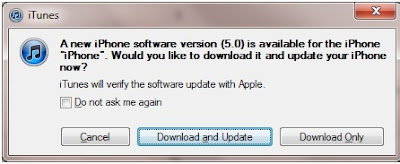


2) I received this message because looks like it figured out that I am not using my primary computer where I had my iTunes library resides. But again, make sure you made a BACKUP before doing these steps


3) Click 'Next'


4) Click 'Agree'


5) Well now its the waiting game. Just follow whatever iTunes tells you.

PLEASE try not to do any other activities on your computer while doing this. Just wait till it finish.

Once everything is finished, you must be wondering what happened to all the Apps, songs and other missing things.

Well I went through the iCloud setup and all once the update was completed. 

But my main question was where are all the apps. 

The only solution I had was to reconnect my iPhone to my laptop and then when iPhone logo comes up, (Make sure its your primary computer/all of the backed up items are there) click on sync or apply from the right hand screen. 

So depending upon how much stuff you have on your iPhone, it could take hours to restore it back to the iPhone...

The main thing I noticed was that most of my folders were gone , now i have a boring process of creating them again.


Thursday, June 24, 2010

iPhone 4 is out. What about the Case?

iPhone 4 case is the hottest topic on the web according to the website Alexa.com. Obvious reason, people didn't want to  spend 30-40 dollars for a side bumper cover.

Here is a list that I made to help other iPhoner's to find a case or screen protectors. I haven't yet received my iPhone or the accessories . But I wanted to make sure that I have some kind of protection beforehand, whether it fits or not.

          This is what they claim: "Designed with a clean and smooth back, the Pure Crystal Slip maintains the 
          originality of your Apple iPhone 4."
          I havent received the product yet. But lets see.Even though it say's for free, the shipping is around $5     
           If you want some more fancy with screen protectors, you might want to look for Anti-Glare screen  
           protectors. They may be a bit more expensive. But will have some benefits.
 There are so many sites offers you cases according to your preference & style. But do a lot of research on what those cases will do for your iPhone. I've bought may be at least 5 cases for my iPhone 3G. But each time I am half satisfied. Either I dont like it that much, but if I like it other problems starts to occur. I had a nice clear case, after a week or so dust started to accumulate between the surfaces, and I had to clean it all the time. Some cases offers you full protection like a full body armor. But you don't want to end up hiding your iPhone. Hardcases are fine, but get Thermoplastic Polyurethane (TPU). Its flexible. Here is a youtube video showing what it is.

 My mission is not to spend anything over $10 for cases. So I cant guarantee anything about the quality. The best place in the world for that is Ebay. But just read through every fine print before you buy the item even if it is priced for 99 cents. 


I will have a full review of the cases that I am going to receive in a week or so. Hopefully Apple will send my iPhone 4 by July 19 :)  ..... So stay tuned!!!

In the mean time  if you know any good websites that sells cheap cases, please post it.


Note: I am not advertising for the companies mentioned above. This is just an independent review.

iPhone 4 is out. - Look at the review from CNET

Here it is